BOQ software: AiN Engine, the tool I work with and develop
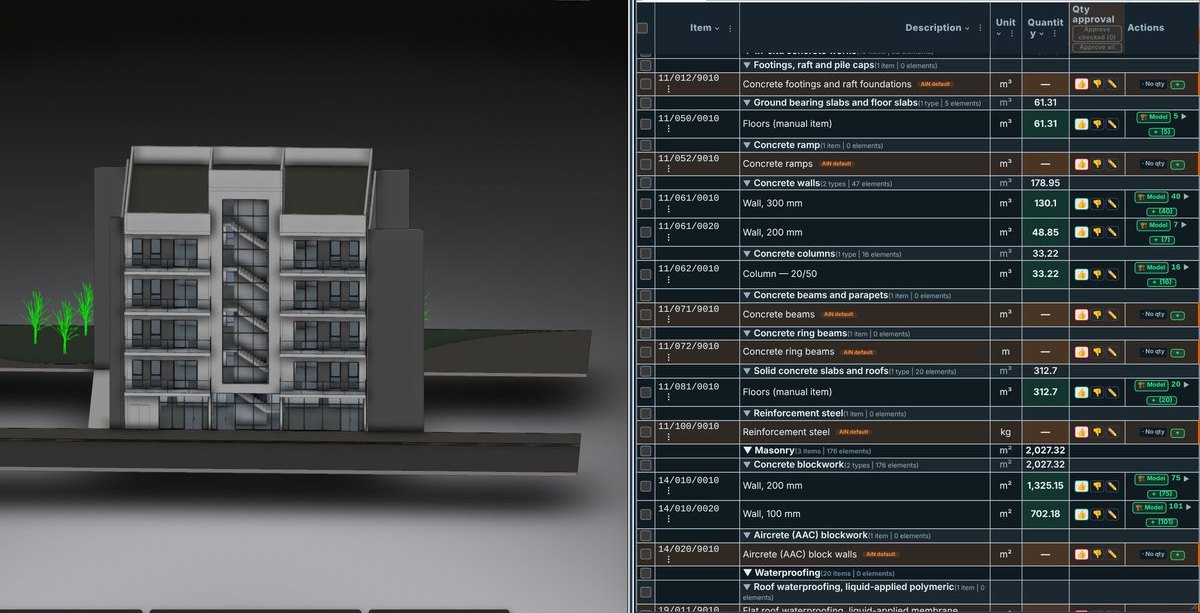
The BOQ software I use on every project is AiN Engine, software I develop myself. It reads a Revit model, sorts the elements into chapters and items, and produces a bill of quantities in Excel, while every quantity that came from the model stays linked to the elements it was measured from. This page collects the windows of the software: what you see in each one, what it does, and why it matters to a quantity surveyor, a contractor and a developer.
Why a quantity surveyor builds his own BOQ software
I am Yaakov Avital, a quantity surveyor and registered building technician in Israel, and bills of quantities are my daily work. For years I saw the same problem on every project: the model knows a lot about the building, but the road from the model to a bill of quantities runs through manual exports, crowded spreadsheets and repeated checks. Every design change sends part of the work back to the start, and nobody can point at a line and say for certain where its quantity came from.
So I started building my own tool. It is not a side project: AiN is built from real field work, with models, specifications, spreadsheets and tenders, and it is tested on the same kinds of projects I price. Two hats, one profession: a quantity surveyor who builds the tools he works with. AiN was published on the Autodesk App Store in May 2026.
What BOQ software like AiN does, in five steps
- Extraction from the model: elements, families, volumes and areas are read from the Revit or Navisworks model. The geometry is computed consistently, so the same model always gives the same result. Nothing that is missing from the model is invented.
- Normalising and mapping: element names are translated into engineering and contractor language and mapped to items following the project's chapter structure. The mapping is a proposal that you can correct and approve.
- A matrix by floor and phase: the data is arranged by floors, phases and categories, so you see the building the way a budget controller does.
- Resources and schedules: the BOQ feeds a resources sheet, where a main element such as concrete is broken into labour, material, rebar and formwork, and Gantt sheets for planning. The project's own rates replace the defaults.
- Producing the bill of quantities: an orderly Excel workbook ready for submission, with item numbers, quantities and a source for every quantity. Downloads need an active subscription.
What works today and what does not: the whole process of preparing a bill of quantities can be done in the software, but not all of it is automatic. Concrete has the highest level of automation. Finishes, building services and rebar are done with the model data, mapping, editing and manual additions. Every result is checked by a quantity surveyor or an engineer before it is used in a tender or a payment claim.
The windows of the software
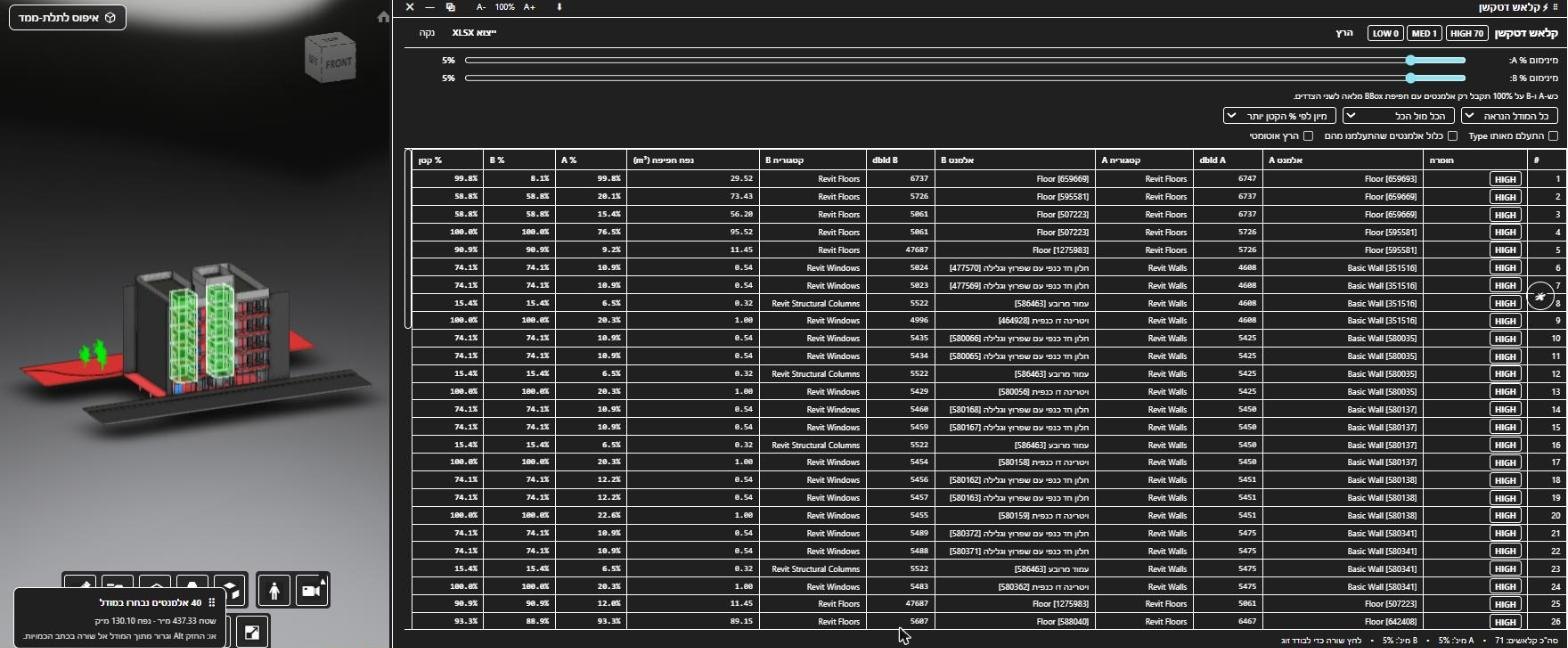
Every window in AiN answers one question that a quantity surveyor asks during the work. Each window has its own page, with a screenshot, what you see in it and the advantage in real work:
BOQ software versus a spreadsheet built by hand
In a spreadsheet built by hand, a number is just a number. If someone asks where 130 cubic metres of concrete walls came from, you go back to the drawings and measure again. In the software, you click the line and see in the model the 40 walls that the quantity was measured from, with their area and volume. It also works the other way: you select elements in the model and assign them to a line.
The second difference is transparency. Every line shows the source of its quantity: from the model, calculated from the model, or added by hand. A manual line is marked as such and never pretends to be model data. Every line has a status, proposed, to review or approved, and the decision always belongs to a person. That turns the bill of quantities into a document you can work with alongside a developer, a contractor and a subcontractor, because every number has evidence behind it.
To see how the pieces fit together in practice, start with the full bill of quantities window and then the link between a line and the model.
Who this kind of BOQ software is for
- Developers: when there is no early certainty about the budget, gaps and variations show up before the tender and before construction, not in the middle of it.
- Contractors: when the bill of quantities, the model and the payment claims do not talk to each other, you get a bill of quantities linked to the model and to evidence, which makes checking a claim against what was built easier.
- Quantity surveyors: instead of manual measuring, crowded spreadsheets and repeated checks, you get automatic sorting, control and a file you can hand to a client without apologising for any line.
Frequently asked questions
Does BOQ software replace a quantity surveyor?
No. The software shortens the measuring and the sorting, and leaves the professional decisions to the quantity surveyor: what goes into an item, how it is priced, and what is missing from the model. That is exactly how I use it in my own work.
Which files can go into the software?
Revit and Navisworks models, IFC files, and Excel files, depending on what the project has. Whatever is missing from the model is added by hand and marked.
Does the AI in the software approve quantities?
No. The AI helps with classification, mapping and spotting anomalies. Each of its suggestions stays marked as proposed until a person checks and approves it.
What do you get at the end?
A structured Excel file with a bill of quantities by chapter and a source for every quantity. Inside the software every line stays linked to its model elements, with an approval column. Downloads need an active subscription.
Want to see AiN on your own model? The AiN Engine site has the demo video, the pilot for one project and the login. For quantity surveying work in Israel, write to me through the form.
AiN Engine website Contact form* Created with AI for marketing, for illustration only. Not reviewed by Yaakov Avital and not professional advice. Every project must be checked on its own by a professional quantity surveyor and an engineer.