PDF quantity takeoff: quantities from 2D drawings when there is no model
PDF quantity takeoff is still a large part of the work, because not every project arrives with a model. AiN Engine, the BOQ software I develop and work with, has a set of tools that work directly on 2D drawings: analysis of PDF files and images, analysis of DWG and DXF files, manual measuring tools, and a Garmoshka sheet inside the bill of quantities. In the drawing analyses, AI suggests quantities, and the quantity surveyor checks them and decides what goes into the bill.
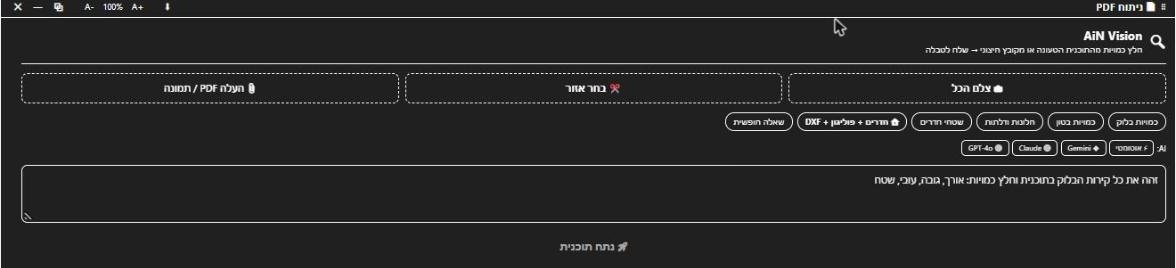
PDF quantity takeoff in AiN: what you see
The first three sit in the Tools menu, in both the English and the Hebrew interface, and the Garmoshka sheet lives inside the bill of quantities. Each one suits a different kind of drawing.
- PDF Vision. There are three ways to bring a drawing in: capture the whole view, select a region, or upload a PDF or an image. Then you pick a ready analysis: block walls, concrete, windows and doors, room areas, rooms with polygons and a DXF export, or a free question. You can choose the AI engine or leave the choice on automatic, and the results land in a table.
- AutoCAD AI Vision. You load a DWG or DXF file and run an analysis: block walls, openings, room areas, concrete, an entity list, or a free question.
- Takeoff Tools. Scale calibration, distance, area, angle and count, used directly on the model or on a sheet open in the viewer. These are manual measurements: the number is what you measured.
- The Garmoshka sheet. A tab in the bill of quantities window with a table you fill in by hand against an image of a drawing from the permit set. In Israel the folded set of permit drawings is called the garmoshka, and this sheet keeps its data next to the project's bill of quantities.
Under the PDF Vision window there is also an embedded measuring tool made by a third party. It is not part of AiN, so I do not describe it on this page as something the software does.
What it gives you when there is no model
I work as a quantity surveyor in Israel, and not every project that reaches me comes with a model. The first advantage of these tools is a starting point. Instead of a blank sheet, the AI reads the drawing and suggests quantities for walls, openings, concrete and room areas. What you get is a list to check, not a final number.
The second advantage is a rule that protects the bill of quantities: if the drawing has no scale, PDF Vision produces no quantities and says so plainly instead of guessing. A scanned drawing without a scale stays without quantities, which is exactly what should happen. In a PDF quantity takeoff, a missing value is better than a number that only looks right.
The third advantage is that everything lives in one place: PDF and DWG analysis, manual measurement in the viewer, and the permit-set data inside the bill of quantities. When a model arrives for part of the project, you carry on in the same software with quantity takeoff from the model data.
How to use it, step by step
This is how a PDF quantity takeoff runs for me in AiN:
- Sign in and open PDF Vision or AutoCAD AI Vision from the Tools menu.
- Bring the drawing in: a capture of the view, a selected region, a PDF or an image, or a DWG or DXF file.
- For a PDF or an image, check first that the drawing has a scale. Without one there will be no quantities.
- Pick a ready analysis or write a free question. In PDF Vision you can also choose the AI engine, or leave it on automatic.
- Go through the table that comes back. Every line is a suggestion, and anything that looks suspicious I measure myself against the drawing.
- Only after that check do I put the quantity into the bill of quantities, with a note of the drawing and the method it was measured by.
Limits, and what does not exist yet
PDF Vision and AutoCAD AI Vision need a signed-in account. Downloading files from AiN, such as the DXF export of rooms, needs an active subscription. The manual measuring tools are open to every user, and they measure what is open in the viewer: a model or a sheet.
In my own work, calibrating against a dimension written on the drawing is fine. A scale based on a guess does not go into the calculation, and a drawing without clear dimensions goes back to the designer with a question.
What these windows do not do: they do not replace the check. Every AI result is a suggestion until a person reviews it, and none of these windows produces a complete bill of quantities on its own. The Garmoshka sheet is fully manual too: automatic reading of the drawing is not part of it yet.
Frequently asked questions
Can I get a complete bill of quantities from a PDF drawing?
Not in one click. PDF Vision suggests quantities for defined subjects such as block walls, concrete, windows and doors, and room areas. A quantity surveyor builds and checks the bill of quantities, and the quantities read from the drawing are raw material for that check.
What is the difference between PDF Vision and AutoCAD AI Vision?
PDF Vision works on a picture of the drawing: a PDF file, an image, a capture of the view or a region you select. AutoCAD AI Vision works on a DWG or DXF file and can also list its entities. In both, the result is a suggestion that has to be checked.
Is the measuring tool under the PDF window part of AiN?
No. It is a third-party tool embedded in the window. AiN's own measuring tools are in the Takeoff Tools window and work in the viewer: calibration, distance, area, angle and count.
Who approves the quantities?
A person. The AI reads the drawing and suggests; the decision about what goes into the bill belongs to the quantity surveyor. How this works across the rest of the software is described on the AI quantity surveying page, and all the windows are collected on the BOQ software page.
Want to see AiN on your own model? The AiN Engine site has the demo video, the pilot for one project and the login. For quantity surveying work in Israel, write to me through the form.
AiN Engine website Contact form* Created with AI for marketing, for illustration only. Not reviewed by Yaakov Avital and not professional advice. Every project must be checked on its own by a professional quantity surveyor and an engineer.